≡ Menu

I’m going to get straight to the point.

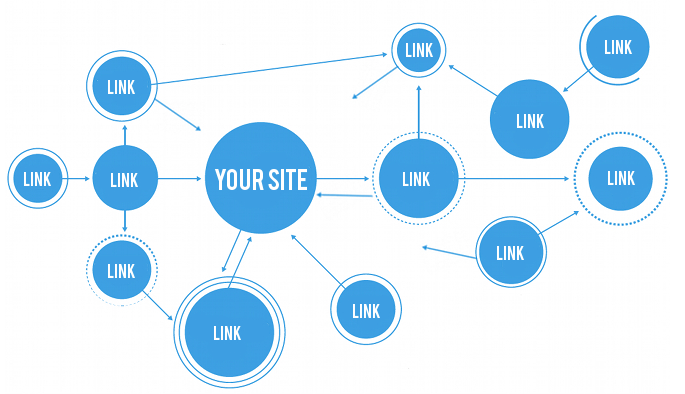
If you want your content to rank on the first page of Google for the keywords you’re targeting you need to create a lot of killer content and have a good link building strategy in place.

 
In this quick article I would like to share with you 5 of my favorite link building strategies so you can get better rankings on Google and get more traffic and leads for your business!


1 – Blog Commenting 

Dropping comments on other blogs in your niche is a great linkbuilding strategy plus it won’t cost you a penny.

What you don’t want to do is post “Awesome blog post” just to snag a quick and easy backlink.

Actually post a comment that contributes to the post and adds value. Doing this will get you noticed and you might even get a few people to click over to your website.


2 – The Skyscraper Technique

This is a link building strategy invented by Brian Dean of Backlinko.

What you do is find a blog post that has high quality backlinks you want as well.

Once you figure out what topic the blog post is about publish a blog post around that same topic but only better (more words and more in depth).

Then simply ask the blog owners who backlinked to the blog post you wrote a better on one if you can get a backlink too!

There is a good chance they will say yes because your content is relevant and better.


3 – Publish Ultimate Guides 

An ultimate guide is basically a long form blog post that covers an entire topic/keyword. Publishing long form blog posts is one of the best ways to get tons of high quality backlinks from credible bloggers in your niche.

Two bloggers who are great at creating ultimate guides are Neil Patel and Brian Dean of Backlinko.

Here is a great blog post on creating ultimate guides.


4 – Broken Link Building 


This is a link building strategy where you find broken links then reach out to webmasters with a blog post/resource you’ve published to replace the link.

It’s a win win situation because you’re fixing the broken link for the webmaster and acquiring a link as well.


5 – Guest Blog

Guest blogging is a great way build brand awareness and get in front of another audience but it’s also a great way to build backlinks.

Most webmasters who accept guest posts will let you place a link back to your website,product or lead magnet (usually in your bio box at the end of the guest post).

Once again it’s a win win situation because the blogger who accepted the guest post got content for their blog and you acquired a backlink!


Conclusion

Hope these link building strategies helped. Remember,the best way to get backlinks is to create content that is so good that other bloggers naturally link to you.

So,what link building strategy has worked best for you? Let us know in the comments below.


{ 0 comments }

AWeber Review 2023 – Pros and Cons

Welcome to my AWeber review. I’ve been an AWeber customer for over 10 years and use it in my online business everyday.

Today I would like to talk about the benefits of using AWeber,a few of the features I like and where I think there is some room for improvement.

I want this to be an unbiased review.

Lets get started.

What is AWeber?

AWeber is email marketing software or what entrepreneurs in the internet marketing niche call an “autoresponder.”

With AWeber you can create optin forms and landing pages so you can collect leads and automate a lot of your email marketing.

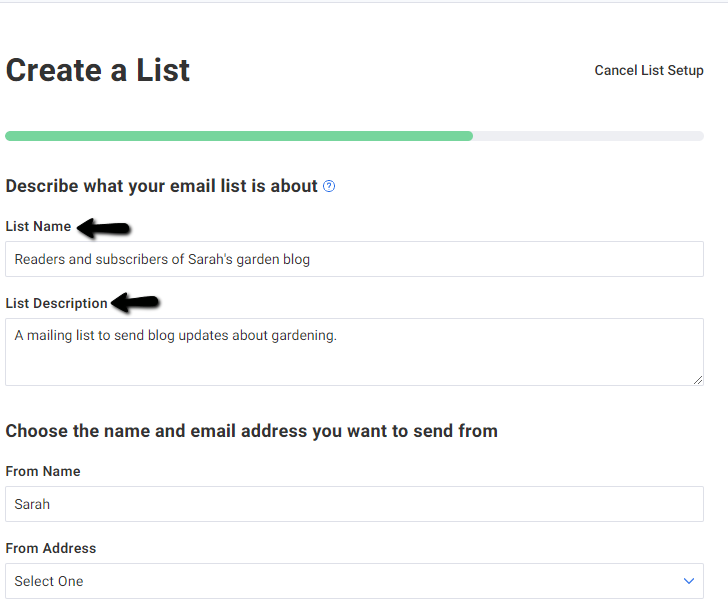
Creating lists inside AWeber

You can create a list inside AWeber with literally a few clicks of you mouse.

Creating a list with AWeber gives you the ability to build an email list around a certain topic/interest.

For example,you may have a gardening blog and you want to email your readers to let them know you just published a new blog post.

Creating a list around the topic of gardening would help you achieve that objective.

With the AWeber Unlimited and Plus plans you can create as many lists as you want.

Their Lite and Free Plans let you only create 1 list.

With AWeber’s landing page builder you have the ability to choose from hundreds of premade templates.

You can load any template into your AWeber account with a few simple clicks of you mouse or start with a blank canvas.


Every landing page you create is hosted by AWeber!

With the AWeber for WordPress plugin you can add optin forms and landing pages to your WordPress blog.

Once your landing page is published you can even share it with other Aweber customers (sort of like the ClickFunnels “share funnel” feature)

AWeber will also let you add a Google Analytics and Facebook pixel to your landing page as well. (you can’t add the Facebook pixel with the AWeber Free plan).

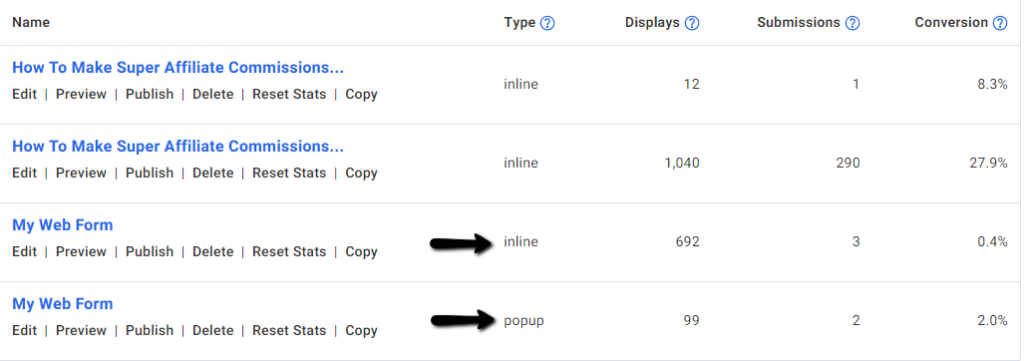
With the AWeber sign up form creator you can create optin forms with a few simple clicks.

You can also create pop ups,pop unders and exit pops.

AWeber also gives you all of the important marketing metrics you need so you can improve conversions with your sign up forms.

These metrics are:

-Impressions (how many unique visitors have seen your sign up form)
-Leads generated
-Conversion rate (ratio of subscribers divided by unique visitors)

You can even split test your forms!

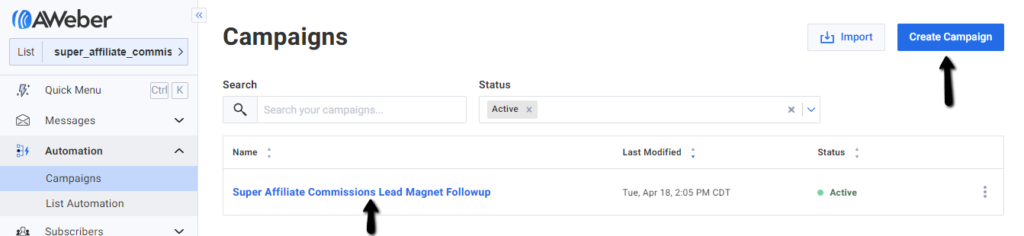
With AWeber’s campaign editor you can create automated email followup sequences that get triggered once someone signs up through one of your optin forms or landing pages and becomes a lead.


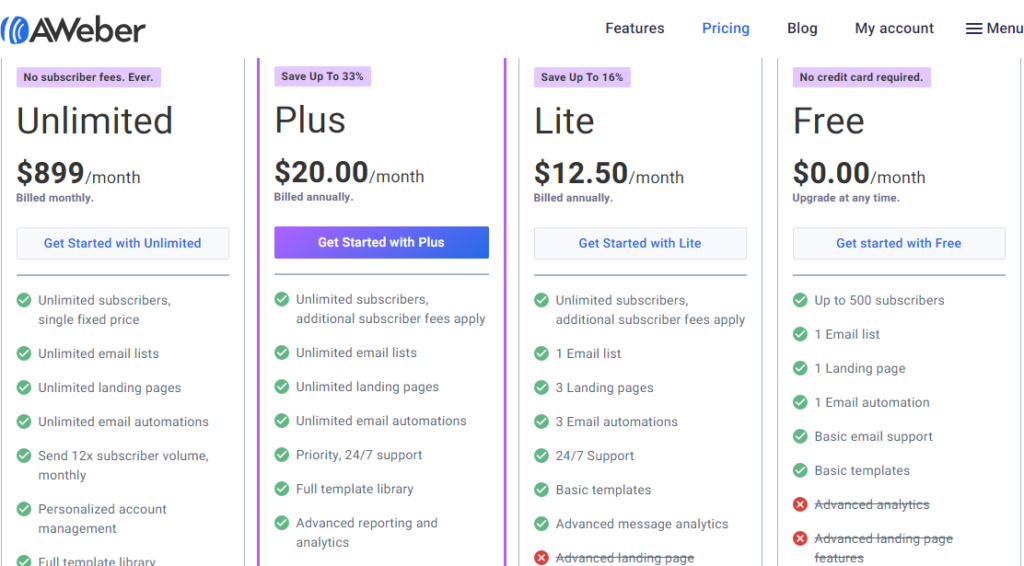
Aweber Pricing:

aweber pricing

Aweber has 4 plans to choose from and they are:

Free – $0.00/month
Lite – $12.50/month
Plus – $20.00/month
Unlimited – $899/month

I’m almost at the end of this AWeber review. Let me briefly talk about the main features of AWeber and what I think are it’s pros and cons.

AWeber features:

-Landing page and sign up form creator
-Automated email followup creator (campaign editor)
-A/B split testing functionality
-Segment email subscribers based on opens,purchases,etc
-Hundreds of landing page templates for any kind of business you can possibly imagine
-600+ email templates
-6,000+ stock images
-Able to share landing pages and email followups with other Aweber customers
-Able to connect with a lot of the tools and apps people use to run their online businesses (app integration)

Aweber Pros:

-They have a free account (up to 500 subscribers,can only create 1 list).
-High level of automation if you connect with the right marketing tools and apps.
-Easy to create optin forms and landing pages
-A/B split testing functionality
-Email followup and landing page sharing feature

Aweber Cons:

-The campaign editor isn’t for newbies
-Unsubscribes cost you unless you delete them from your account


Conclusion

AWeber is perfect for you if you don’t want to spend an arm and a leg for email marketing software.

Not a big a fan of their campaign editor but I guess you can’t have it all.

AWeber is probably one of the best autoresponders on the market and I give it a higher rating than Mail Chimp and Get Response.

>>>Create your FREE AWeber account now!<<<

Hope you liked my AWeber review. If you have any questions let me know in the comments below!


{ 0 comments }