
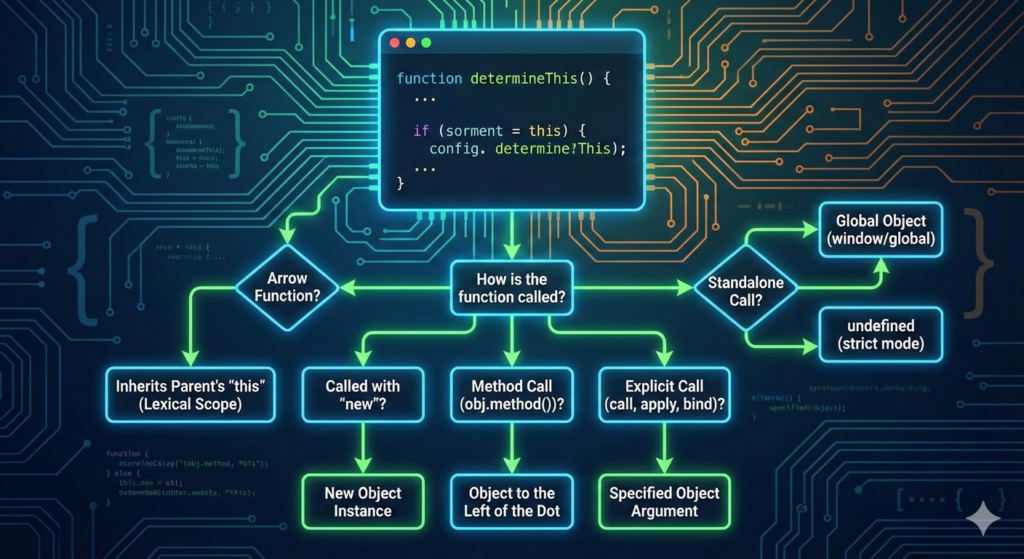
If you’ve ever spent an hour debugging a script only to realize that this wasn’t what you thought it was, welcome to the club.
Every JavaScript developer—from bootcamp students to senior engineers—has been bullied by the this keyword at some point.
In most programming languages, this (or self) is straightforward: it refers to the current instance of the class.
In JavaScript? It’s a shapeshifter.
The secret to mastering this is a single sentence: It’s not about where the function is defined; it’s about how the function is called.
1. The Global Context: The Default Setting
When you call a function in the middle of nowhere (the global scope), this has to point somewhere. By default, it points to the “Global Object.”
-
In a browser:
thisis thewindowobject. -
In Node.js:
thisis theglobalobject.
⚠️ The “Strict Mode” Warning: If you are using
'use strict';, JavaScript protects you from accidentally modifying the global object. In strict mode, a standalone function call will result inthisbeingundefined.
function showMe() {
  console.log(this);
}

showMe(); // Window (in non-strict) or undefined (in strict)
2. Implicit Binding: The “Left of the Dot” Rule
This is the most common way you’ll encounter this. When a function is called as a method of an object, this refers to the object to the left of the dot
const skyscraper = {
  floors: 100,
  describe() {
    console.log(`This building has ${this.floors} floors.`);
  }
};

skyscraper.describe(); // "This building has 100 floors."
In this case, skyscraper is to the left of .describe(), so this becomes skyscraper.
3. Explicit Binding: Taking Control
Sometimes, you want to tell a function exactly what this should be, regardless of how it’s called. JavaScript gives us three methods to “force-feed” a context to a function: call(), apply(), and bind().
-
.call()and.apply(): These invoke the function immediately. The only difference is how they handle extra arguments (call takes a list, apply takes an array). -
.bind(): This is the “stubborn” one. It creates a new function that is permanently bound to the object you provide.
const pilot = { name: 'Maverick' };

function fly() {
  console.log(`${this.name} is taking off!`);
}

const forcedFly = fly.bind(pilot);
forcedFly(); // "Maverick is taking off!"
4. The new Keyword Binding
When you use the new keyword to create an instance of a constructor function or a class, JavaScript does some magic. It creates a brand-new object and tells the function: “For this specific execution, this is that new object you just made.”
function Hero(name) {
  this.name = name;
}

const batman = new Hero('Bruce');
// 'this' inside Hero was the brand new 'batman' object.
5. The Modern Game-Changer: Arrow Functions
Introduced in ES6, arrow functions (=>) changed the rules of the game. Arrow functions do not have their own this.
Instead, they use Lexical Scoping. They inherit this from the code that physically surrounds them.
This is incredibly useful for callbacks and timers where this often gets “lost.”
const timer = {
  seconds: 0,
  start() {
    setInterval(() => {
      this.seconds++; // 'this' correctly refers to the timer object
      console.log(this.seconds);
    }, 1000);
  }
};
If we used a regular function above, this would have reverted to the window object, and the timer would have broken!
6. The “Cheat Sheet” for Debugging
When you’re stuck, ask yourself these four questions in order:
-
Is the function called with
new? Thenthisis the new object. -
Is the function called with
call,apply, orbind? Thenthisis the object specified in the parentheses. -
Is the function called as a method (
obj.method())? Thenthisis the object before the dot. -
Is it an arrow function? Then
thisis whatever it was in the parent scope. -
None of the above? In strict mode, it’s
undefined. In non-strict, it’s thewindow.
Conclusion
Understanding this isn’t about memorizing a complex API; it’s about being a detective and looking at the call-site.
Once you stop looking at where the function was born and start looking at where it’s being executed, the mystery disappears.
Ready to put this into practice?
Try refactoring an old project’s event listeners using arrow functions and see how much cleaner your code becomes!
Useful links below:
Let me & my team build you a money making website/blog for your business https://bit.ly/tnrwebsite_service
Get Bluehost hosting for as little as $1.99/month (save 75%)…https://bit.ly/3C1fZd2
Best email marketing automation solution on the market! http://www.aweber.com/?373860
Build high converting sales funnels with a few simple clicks of your mouse! https://bit.ly/484YV29
Join my Patreon for one-on-one coaching and help with your coding…https://www.patreon.com/c/TyronneRatcliff
Buy me a coffee  https://buymeacoffee.com/tyronneratcliff


