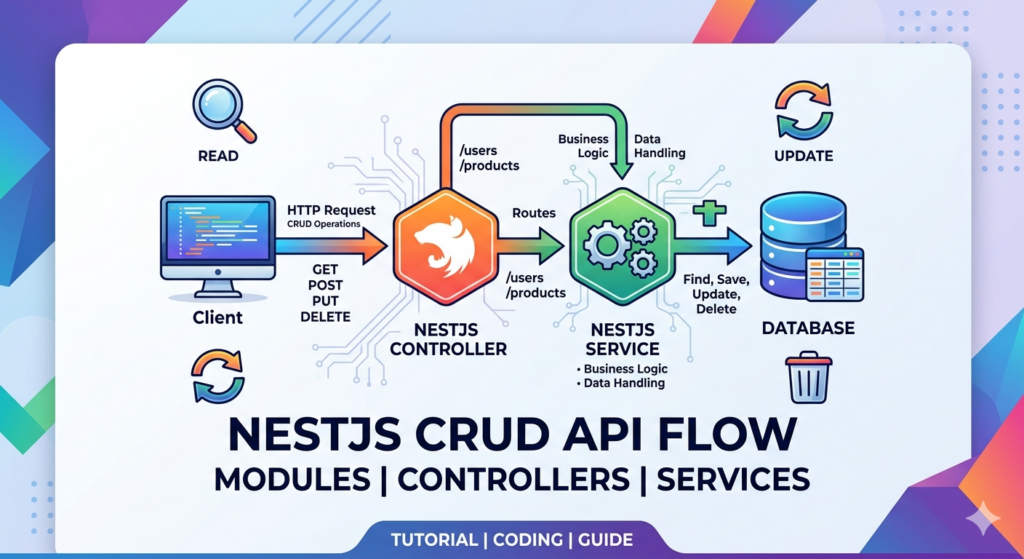
When building APIs with Express or Fastify, authentication logic often turns into a messy web of manual middleware, passport injections, and loosely typed request objects.
When you transition to NestJS, you are handed a highly structured, enterprise-grade architecture specifically designed to isolate side-effects and streamline identity verification.
In this deep dive, we’ll move past basic tutorial setups to look at how to build a production-ready, modular authentication system in NestJS using native Guards, Strategies, and custom Execution Context decorators.
The Architecture: How NestJS Authenticates a Request
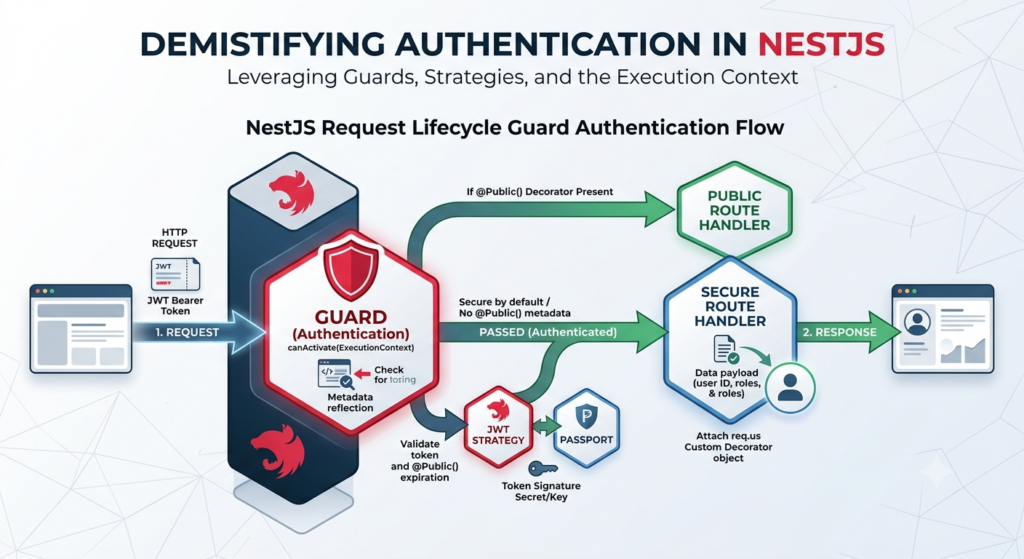
Before writing code, it is critical to understand where authentication actually lives in the NestJS request lifecycle.
Instead of treating authentication like global middleware that intercepts every single string of network traffic blindly, NestJS utilizes Guards. Guards have access to the ExecutionContext instance, allowing them to know exactly which controller method and route handler a request is trying to hit before letting it pass through.
Step 1: Designing the Authentication Domain
A scalable NestJS application keeps its domains decoupled. We will establish an AuthModule that acts as the coordinator, interacting with a separate UsersModule to validate credentials.
Let’s install the core dependencies first:
npm install @nestjs/jwt @nestjs/passport passport passport-jwt bcrypt
npm install --save-dev @types/passport-jwt @types/bcrypt
Now, let’s look at the foundational Authentication Module configuration:
// src/auth/auth.module.ts
import { Module } from '@nestjs/common';
import { JwtModule } from '@nestjs/jwt';
import { PassportModule } from '@nestjs/passport';
import { AuthService } from './auth.service';
import { AuthController } from './auth.controller';
import { UsersModule } from '../users/users.module';
import { JwtStrategy } from './strategies/jwt.strategy';

@Module({
  imports: [
    UsersModule,
    PassportModule.register({ defaultStrategy: 'jwt' }),
    JwtModule.register({
      secret: process.env.JWT_SECRET || 'fallback_secret_production_danger',
      signOptions: { expiresIn: '1h' },
    }),
  ],
  controllers: [AuthController],
  providers: [AuthService, JwtStrategy],
  exports: [JwtStrategy, PassportModule],
})
export class AuthModule {}
Step 2: The Core Passport Strategy
NestJS handles passport integration through @nestjs/passport by extending a class base. The Strategy is responsible for extracting the payload from incoming requests, verifying it, and attaching the validated claims to the request thread.
Here is a highly resilient JWT Strategy implementation:
// src/auth/strategies/jwt.strategy.ts
import { Injectable, UnauthorizedException } from '@nestjs/common';
import { PassportStrategy } from '@nestjs/passport';
import { ExtractJwt, Strategy } from 'passport-jwt';
import { UsersService } from '../../users/users.service';

interface JwtPayload {
  sub: string; // User ID
  email: string;
}

@Injectable()
export class JwtStrategy extends PassportStrategy(Strategy, 'jwt') {
  constructor(private usersService: UsersService) {
    super({
      // Extract token directly from HTTP Authorization Bearer Header
      jwtFromRequest: ExtractJwt.fromAuthHeaderAsBearerToken(),
      ignoreExpiration: false,
      secretOrKey: process.env.JWT_SECRET || 'fallback_secret_production_danger',
    });
  }

  // Passport automatically calls this after validating the JWT signature and expiration
  async validate(payload: JwtPayload) {
    const user = await this.usersService.findById(payload.sub);
    if (!user) {
      throw new UnauthorizedException('User no longer exists in system database');
    }

    // Whatever is returned here is automatically attached to req.user
    return { id: user.id, email: user.email, roles: user.roles };
  }
}
Step 3: Creating a Global but Bypasable Guard
Many boilerplate apps require you to add @UseGuards(JwtAuthGuard) over every single controller manually. This is error-prone—if a developer forgets to add the decorator to a new controller file, that route remains entirely exposed to the public internet.
The production approach is to make authentication secure by default globally, and then explicitly mark specific endpoints (like Login or Register) as public.
First, let’s create a custom decorator to tag public endpoints using metadata reflection:
// src/auth/decorators/public.decorator.ts
import { SetMetadata } from '@nestjs/common';

export const IS_PUBLIC_KEY = 'isPublic';
export const Public = () => SetMetadata(IS_PUBLIC_KEY, true);
Next, let’s create our custom JWT Auth Guard that reads this metadata:
// src/auth/guards/jwt-auth.guard.ts
import { ExecutionContext, Injectable } from '@nestjs/common';
import { Reflector } from '@nestjs/core';
import { AuthGuard } from '@nestjs/passport';
import { IS_PUBLIC_KEY } from '../decorators/public.decorator';

@Injectable()
export class JwtAuthGuard extends AuthGuard('jwt') {
  constructor(private reflector: Reflector) {
    super();
  }

  canActivate(context: ExecutionContext) {
    // Check if the route or controller handler has the @Public() decorator attached
    const isPublic = this.reflector.getAllAndOverride<boolean>(IS_PUBLIC_KEY, [
      context.getHandler(),
      context.getClass(),
    ]);

    if (isPublic) {
      return true; // Bypass authentication entirely
    }

    // Otherwise, execute the standard Passport JWT validation rules
    return super.canActivate(context);
  }
}
To register this globally across your entire API, plug it into your root application module using the APP_GUARD token:
// src/app.module.ts
import { Module } from '@nestjs/common';
import { APP_GUARD } from '@nestjs/core';
import { AuthModule } from './auth/auth.module';
import { JwtAuthGuard } from './auth/guards/jwt-auth.guard';

@Module({
  imports: [AuthModule],
  providers: [
    {
      provide: APP_GUARD,
      useClass: JwtAuthGuard, // Protects every endpoint automatically!
    },
  ],
})
export class AppModule {}
Step 4: Accessing the Session Safely via Custom Decorators
When a route passes through our guard, the validated database payload sits inside req.user. Referencing req.user directly inside your controllers introduces untyped, platform-dependent Express syntax into clean business domains.
Instead, create an Execution Context Decorator to extract the user object cleanly:
// src/auth/decorators/current-user.decorator.ts
import { createParamDecorator, ExecutionContext } from '@nestjs/common';

export const CurrentUser = createParamDecorator(
  (data: unknown, ctx: ExecutionContext) => {
    const request = ctx.switchToHttp().getRequest();
    return request.user; // Abstract away Express dependency completely
  },
);
Putting It Together: The Controller Profile Example
Look at how elegant, readable, and highly typed your endpoints become once this architecture is deployed:
// src/users/users.controller.ts
import { Controller, Get } from '@nestjs/common';
import { Public } from '../auth/decorators/public.decorator';
import { CurrentUser } from '../auth/decorators/current-user.decorator';

@Controller('users')
export class UsersController {

  // 1. This route is public - accessible by anyone without tokens
  @Public()
  @Get('landing-info')
  getFreeMetrics() {
    return { status: 'Server operational' };
  }

  // 2. This route is secure by default. Clean parameter extraction via decorator.
  @Get('profile')
  getProfile(@CurrentUser() user: any) {
    return {
      message: 'Secure data accessed successfully',
      authenticatedUser: user,
    };
  }
}
Summary: The Production Takeaway
By leaning into NestJS’s built-in dependency injection, reflector engine, and request lifecycles, you get code that is:
-
Safe by Default: New developers can’t accidentally expose endpoints because protection is configured globally.
-
Highly Testable: Guards and Strategies are isolated classes that can be mocked easily in isolation during unit testing.
-
Declarative: Bypassing authentication or extracting execution session records is handled via clean decorators (
@Public(),@CurrentUser()), keeping your controllers lightweight and readable.
Coding Quote of the Day:
“Authentication is proving who a user is. Authorization is proving what they can do. Mixing the two up is where the production bugs live.”
— Unknown
Useful links below:
Let me & my team build you a money making website/blog for your business https://bit.ly/tnrwebsite_service
Get Bluehost hosting for as little as $1.99/month (save 75%)…https://bit.ly/3C1fZd2
Best email marketing automation solution on the market! http://www.aweber.com/?373860
Build high converting sales funnels with a few simple clicks of your mouse! https://bit.ly/484YV29
Join my Patreon for one-on-one coaching and help with your coding…https://www.patreon.com/c/TyronneRatcliff
Buy me a coffee  https://buymeacoffee.com/tyronneratcliff