
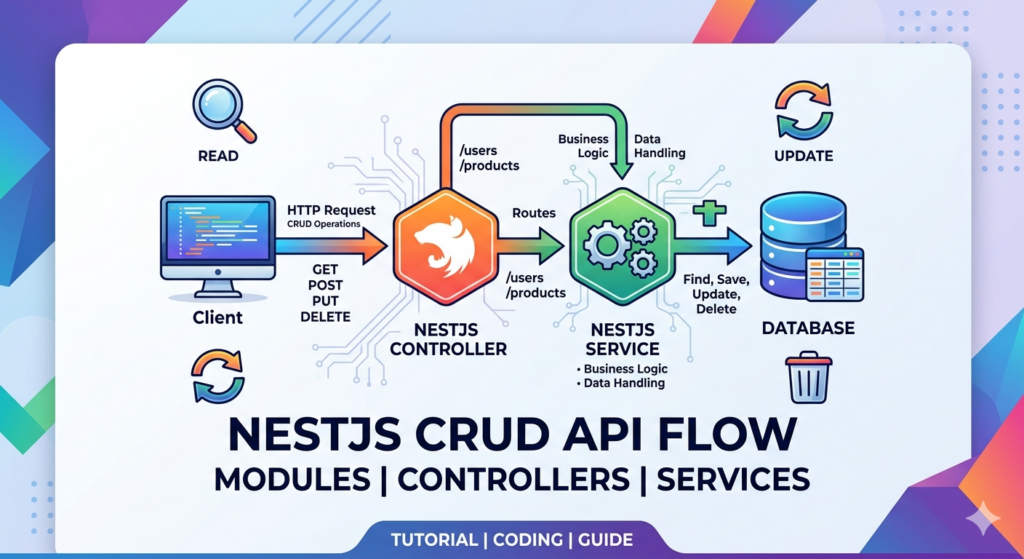
When you are building a modern backend, CRUD (Create, Read, Update, Delete) forms the bedrock of almost every application.
While frameworks like Express make you piece together your own routing and controller structures, NestJS provides a standardized, structural architecture right out of the box.
In this tutorial, we will build a clean, fully functional CRUD API for a “Products” resource using NestJS.
The NestJS Blueprint
Before writing code, it helps to understand how data flows through a NestJS application. Nest relies on a clear separation of concerns, dividing responsibilities into three core building blocks:
-
Modules: Containers that organize and group related code (Controllers and Services) together.
-
Controllers: Route handlers responsible for receiving incoming HTTP requests and sending back responses.
-
Services (Providers): The dedicated layer for your business logic, such as data validation, database queries, or calculations.
1. Project Setup and Scaffolding
Instead of creating files manually, we will use the powerful Nest CLI to scaffold our project and resource boilerplate instantly.
# Install the NestJS CLI globally
npm i -g @nestjs/cli

# Create a new project
nest new nestjs-crud-api
cd nestjs-crud-api

# Automatically generate a full CRUD resource for 'products'
nest g resource products
When prompted, choose REST API and select Yes to generating CRUD entry points.
The CLI will generate a beautifully structured src/products folder containing your module, controller, service, and data transfer objects (DTOs).
2. Defining the Product Interface
For this simple in-memory tutorial, let’s establish what a Product looks like. Create or update the src/products/entities/product.entity.ts file:
export class Product {
  id: string;
  title: string;
  price: number;
  inStock: boolean;
}
3. Handling Incoming Data with DTOs
Data Transfer Objects (DTOs) define the schema of the data coming into your API. They ensure your endpoints receive exactly what they expect.
Create Product DTO
Update src/products/dto/create-product.dto.ts:
export class CreateProductDto {
  title: string;
  price: number;
  inStock: boolean;
}
Update Product DTO
NestJS automatically maps your update DTO using PartialType, meaning all fields from the create schema become optional for PATCH requests. Check your src/products/dto/update-product.dto.ts:
import { PartialType } from '@nestjs/mapped-types';
import { CreateProductDto } from './create-product.dto';

export class UpdateProductDto extends PartialType(CreateProductDto) {}
4. Writing the Business Logic (The Service)
The service handles the state and data mutations.
Open src/products/products.service.ts and replace the boilerplate with an in-memory array implementation:
import { Injectable, NotFoundException } from '@nestjs/common';
import { CreateProductDto } from './dto/create-product.dto';
import { UpdateProductDto } from './dto/update-product.dto';
import { Product } from './entities/product.entity';

@Injectable()
export class ProductsService {
  private products: Product[] = [];

  // CREATE
  create(createProductDto: CreateProductDto): Product {
    const newProduct: Product = {
      id: Math.random().toString(36).substring(2, 9), // Simple ID generator
      ...createProductDto,
    };
    this.products.push(newProduct);
    return newProduct;
  }

  // READ (All)
  findAll(): Product[] {
    return this.products;
  }

  // READ (One)
  findOne(id: string): Product {
    const product = this.products.find((p) => p.id === id);
    if (!product) {
      throw new NotFoundException(`Product with ID "${id}" not found`);
    }
    return product;
  }

  // UPDATE
  update(id: string, updateProductDto: UpdateProductDto): Product {
    const product = this.findOne(id);
    const index = this.products.findIndex((p) => p.id === id);

    this.products[index] = { ...product, ...updateProductDto };
    return this.products[index];
  }

  // DELETE
  remove(id: string): { deleted: boolean } {
    this.findOne(id); // Throws 404 if it doesn't exist
    this.products = this.products.filter((p) => p.id !== id);
    return { deleted: true };
  }
}
5. Exposing the Endpoints (The Controller)
NestJS uses routing decorators to map HTTP verbs directly to service methods.
Your src/products/products.controller.ts acts as the traffic controller:
import { Controller, Get, Post, Body, Patch, Param, Delete } from '@nestjs/common';
import { ProductsService } from './products.service';
import { CreateProductDto } from './dto/create-product.dto';
import { UpdateProductDto } from './dto/update-product.dto';

@Controller('products') // Base route: /products
export class ProductsController {
  constructor(private readonly productsService: ProductsService) {}

  @Post()
  create(@Body() createProductDto: CreateProductDto) {
    return this.productsService.create(createProductDto);
  }

  @Get()
  findAll() {
    return this.productsService.findAll();
  }

  @Get(':id')
  findOne(@Param('id') id: string) {
    return this.productsService.findOne(id);
  }

  @Patch(':id')
  update(@Param('id') id: string, @Body() updateProductDto: UpdateProductDto) {
    return this.productsService.update(id, updateProductDto);
  }

  @Delete(':id')
  remove(@Param('id') id: string) {
    return this.productsService.remove(id);
  }
}
Summary of Completed Endpoints
With your server running via npm run start:dev, you can now test your API using tools like Postman, Bruno, or cURL against these routes:
| HTTP Method | Endpoint | Description | Expected Payload |
| POST | /products |
Creates a new product | { "title": "Keyboard", "price": 120, "inStock": true } |
| GET | /products |
Retrieves all products | None |
| GET | /products/:id |
Retrieves a single product by ID | None |
| PATCH | /products/:id |
Updates specific fields of a product | { "price": 99 } |
| DELETE | /products/:id |
Deletes a product by ID | None |
By utilizing NestJS’s structured framework, you have built an API layer that is decoupled, highly testable, and naturally scalable as your data requirements grow.
Coding Quote of the Day:
“Clean code always looks like it was written by someone who cares.”
— Michael Feathers
Useful links below:
Let me & my team build you a money making website/blog for your business https://bit.ly/tnrwebsite_service
Get Bluehost hosting for as little as $1.99/month (save 75%)…https://bit.ly/3C1fZd2
Best email marketing automation solution on the market! http://www.aweber.com/?373860
Build high converting sales funnels with a few simple clicks of your mouse! https://bit.ly/484YV29
Join my Patreon for one-on-one coaching and help with your coding…https://www.patreon.com/c/TyronneRatcliff
Buy me a coffee  https://buymeacoffee.com/tyronneratcliff


