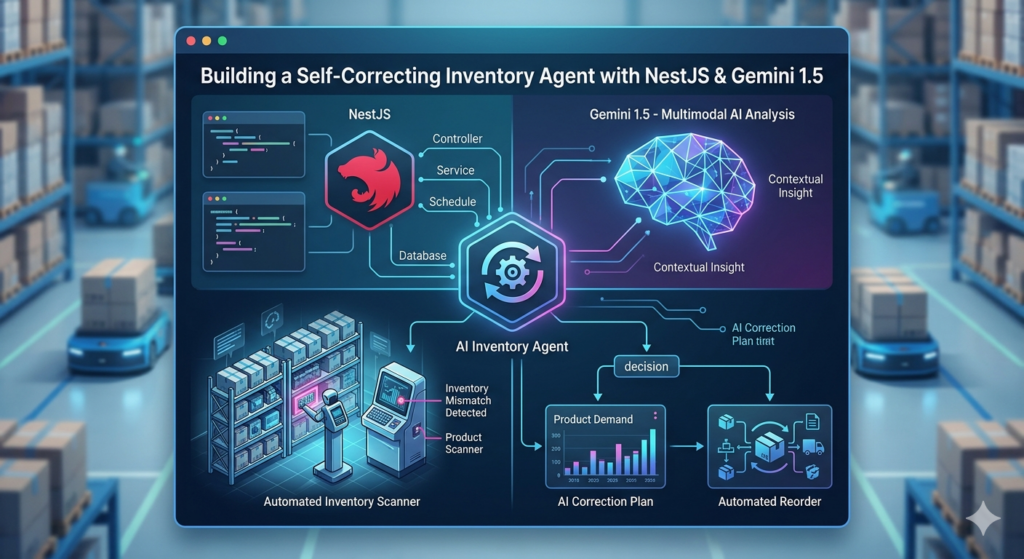
This detailed tutorial bridges the gap between basic “Chatbot” development and true Agentic Engineering.
We’re building a NestJS service that doesn’t just answer questions—it identifies problems in your data and fetches solutions autonomously.
In 2026, the “Gold Standard” for AI engineering isn’t just sending a prompt to an LLM. It’s about giving that LLM tools to interact with your private infrastructure. We are going to build an agent that identifies low-stock items, reasons that it needs pricing data, executes a tool-call, and proposes a correction.
The Architecture: The ReAct Loop
To make an agent “self-correcting,” we use the ReAct (Reason + Act) pattern. Instead of a linear “Input -> Output” flow, the agent enters a loop.
-
Reason: The AI determines what it needs to do based on the prompt and previous results.
-
Act: The AI selects a “tool” (a function in your NestJS code) and provides arguments.
-
Observe: Your code executes the function and feeds the real-world result back to the AI.
Step 1: Define Your “Tools” as NestJS Services
In NestJS, tools are simply methods in a service. The AI doesn’t see your source code; it only sees the Function Declaration (the name and description you provide later).
The InventoryTools Service
Create a service that handles the “real world” interactions. In production, these would hit your PostgreSQL database or external APIs.
// inventory-tools.service.ts
import { Injectable } from '@nestjs/common';

@Injectable()
export class InventoryTools {
  /**
   * Tool 1: Fetches problematic items from our private database.
   * Deterministic logic lives here: the SQL query defines what is "low".
   */
  async getLowStockItems() {
    console.log('--- Tool Executed: Checking Database ---');
    // Mocking a database result
    return [
      { id: 'kbd-99', name: 'Mechanical Keyboard', stock: 2, threshold: 10 }
    ];
  }

  /**
   * Tool 2: Fetches pricing from an external supplier.
   */
  async getSupplierPrice(productId: string) {
    console.log(`--- Tool Executed: Fetching Price for ${productId} ---`);
    const prices = { 'kbd-99': 45.00 };
    return {
      productId,
      price: prices[productId] || 0,
      currency: 'USD',
      leadTime: '2 days'
    };
  }
}
Step 2: Configure the Gemini “Brain”
We’ll use Gemini 1.5 Flash because its low latency is critical for the “Observation” phase. If the loop takes 10 seconds per turn, the UX fails.
The Controller Setup
We need to “hand” the tool definitions to the model during initialization.
// inventory-agent.controller.ts
import { Controller, Post, Body } from '@nestjs/common';
import { GoogleGenerativeAI } from "@google/generative-ai";
import { InventoryTools } from './inventory-tools.service';

@Controller('agent')
export class InventoryAgentController {
  private model;

  constructor(private readonly tools: InventoryTools) {
    const genAI = new GoogleGenerativeAI(process.env.GEMINI_API_KEY);

    this.model = genAI.getGenerativeModel({
      model: "gemini-1.5-flash",
      // This describes the tools so the LLM knows when to call them
      tools: [{
        functionDeclarations: [
          {
            name: "getLowStockItems",
            description: "Queries the database for products currently below their minimum stock level.",
          },
          {
            name: "getSupplierPrice",
            description: "Retrieves wholesale pricing and lead times for a specific product ID.",
            parameters: {
              type: "object",
              properties: {
                productId: { type: "string", description: "The SKU or ID of the product" }
              },
              required: ["productId"]
            }
          }
        ]
      }]
    });
  }
}
Step 3: Implementing the Execution Loop
The “magic” happens in the execution logic. You must facilitate the hand-off between the AI’s intent and your code’s execution.
@Post('run')
async runAgent(@Body('prompt') prompt: string) {
  // Start a stateful chat session
  const chat = this.model.startChat();

  // Turn 1: User sends the prompt
  let result = await chat.sendMessage(prompt);
  let response = result.response;

  // Check if the AI wants to call a tool
  const calls = response.functionCalls();

  if (calls && calls.length > 0) {
    const call = calls[0]; // For simplicity, we handle the first call

    // 1. EXECUTE: Dynamically call the tool method in our service
    // We use bracket notation to find the method by the name the AI provided
    const toolData = await this.tools[call.name](...Object.values(call.args));

    // 2. OBSERVE: Send the real-world data back to the Agent
    // The Agent now "sees" the stock levels and prices
    const finalResult = await chat.sendMessage([{
      functionResponse: {
        name: call.name,
        response: { content: toolData }
      }
    }]);

    // Turn 2: The Agent provides the final reasoned answer
    return {
      agentResponse: finalResult.response.text(),
      actionsTaken: [call.name]
    };
  }

  return { agentResponse: response.text(), actionsTaken: [] };
}
Why This Lands You the Job
In a technical interview, showing a basic chatbot is no longer enough. This project demonstrates System Design maturity:
-
Security: You’ve wrapped your private data in a “Tool.” The LLM never has raw SQL access; it only interacts with data through an audited NestJS service.
-
Resource Awareness: By using Gemini 1.5 Flash, you show you understand that Inference Latency is a primary constraint in agentic systems.
-
Deterministic vs. Probabilistic: You’ve placed the “Low Stock” logic in the tool (deterministic code) while leaving the “What should I tell the user?” part to the AI (probabilistic reasoning).
The Challenge: Adding Business Constraints
To turn this into a “Senior” portfolio piece, add a Budget Constraint.
The Drill: Create a new tool getStoreBudget(). Modify your prompt so that if the getSupplierPrice is too high for the remaining budget, the agent must refuse to suggest a restock and instead propose a “Budget Increase Request” to the manager.
That is how you build agentic systems that businesses actually trust with their data and their money.
Useful links below:
Let me & my team build you a money making website/blog for your business https://bit.ly/tnrwebsite_service
Get Bluehost hosting for as little as $1.99/month (save 75%)…https://bit.ly/3C1fZd2
Best email marketing automation solution on the market! http://www.aweber.com/?373860
Build high converting sales funnels with a few simple clicks of your mouse! https://bit.ly/484YV29
Join my Patreon for one-on-one coaching and help with your coding…https://www.patreon.com/c/TyronneRatcliff
Buy me a coffee  https://buymeacoffee.com/tyronneratcliff