
It happens to everyone when they start moving past simple scripts into more complex application architecture.
You hold an object in one variable.
You want to make changes to it without affecting the original state, so you decide to “copy” it to a new variable.
Then, disaster strikes. You change the “copy,” but five minutes later you realize the original has changed too.
You’ve introduced a bug that is notoriously hard to track down if you don’t know what to look for.
The root of this evil lies in how JavaScript (and many other languages) handles memory, leading to the crucial distinction between a Shallow Copy and a Deep Copy.
Here is your guide to never getting bitten by reference bugs again.
The “Why”: The 30-Second Memory Crash Course
Before we define shallow vs. deep, we have to understand why this happens at all.
If you copy a primitive (like a number: let a = 5; let b = a;), the computer actually creates a new “5” in a new memory slot. They are independent.
Objects are different.
Objects can be huge. If the computer duplicated the entire object every time you assigned it to a new variable, your app would grind to a halt. Instead, JavaScript takes a shortcut for efficiency.
When you create an object variable, the variable doesn’t contain the object data.
It contains a reference (a memory address) pointing to where that data lives on the heap.
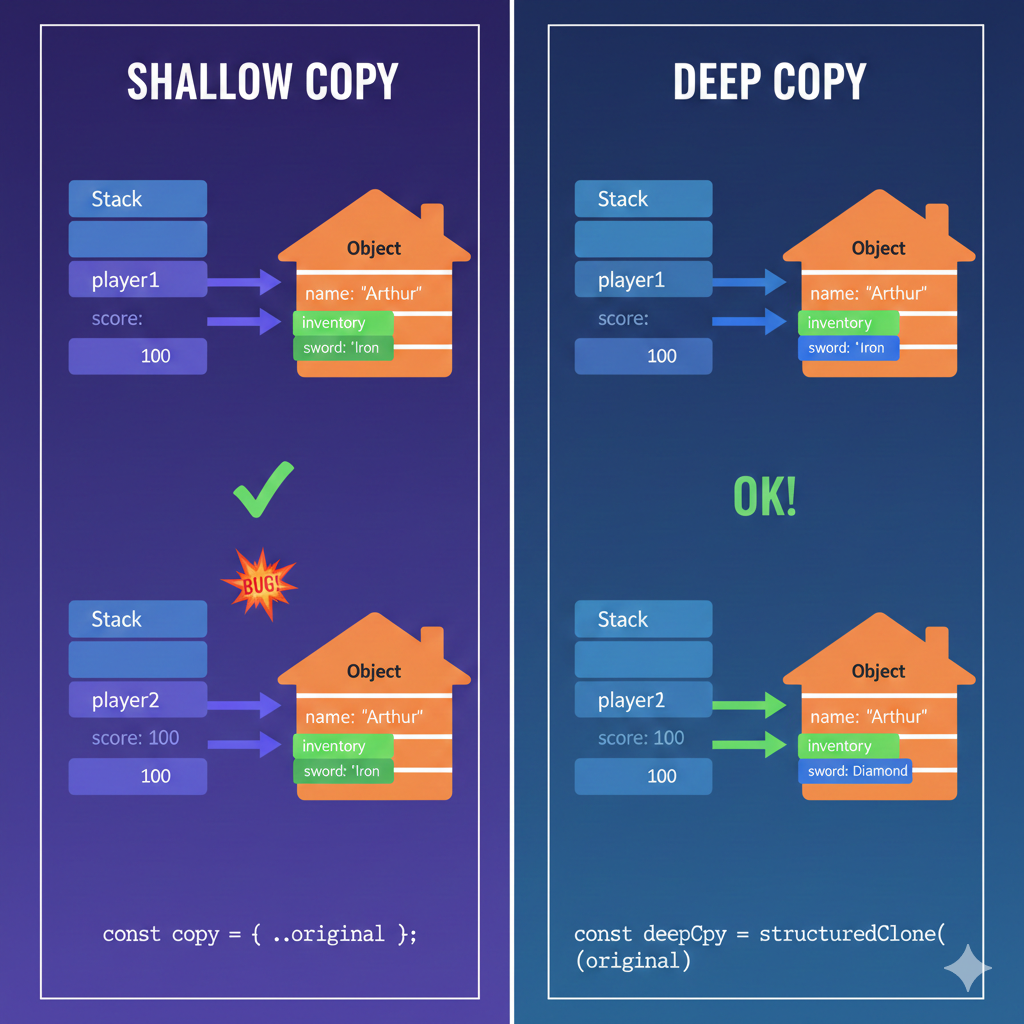
When you do const copy = original, you aren’t copying the data; you are just copying the address. Now two variables point to the exact same house.
To actually duplicate the data, we need specific techniques.
Level 1: The Shallow Copy
A shallow copy is a halfway measure. It creates a brand new “container” object in memory, but it fills that container with the references found in the original object.
In plain English: A shallow copy disconnects the top-level object, but any nested objects (objects inside objects) are still shared properties.
The Modern Way: The Spread Operator ...
The most common way to create a shallow copy in modern JavaScript is using the spread syntax.
const player1 = {
    name: "Arthur",
    score: 100,
    inventory: { sword: "Iron" } // Nested object!
};

// Create a shallow copy
const player2 = { ...player1 };

// Let's change the top level
player2.name = "Lancelot";
console.log(player1.name); // "Arthur"
console.log(player2.name); // "Lancelot"
// SUCCESS! They are disconnected at the top level.
The Shallow Trap (The “Gotcha”)
Because it’s a shallow copy, it didn’t bother creating new space for the nested inventory object. It just copied the reference to it.
// Let's change the nested level on player 2
player2.inventory.sword = "Diamond";

// UH OH.
console.log(player1.inventory.sword); // "Diamond"
// FAIL! The nested objects are still linked.
When to use Shallow Copy:
Shallow copies are fast and efficient. Use them when your data structure is “flat” (no nested arrays or objects), or when you know for a fact you will only be editing top-level properties.
Level 2: The Deep Copy
A deep copy is the nuclear option.
It doesn’t just copy the top container. It looks inside, sees a nested object, creates brand new memory for that, looks inside that, and keeps going recursively until everything in the new tree is physically separate from the old tree.
The Modern Way: structuredClone()
For years, JavaScript didn’t have a built-in way to do this well. As of 2022, we finally have a native, efficient global function supported by all major browsers and Node.js: structuredClone().
const player1 = {
    name: "Arthur",
    inventory: { sword: "Iron" }
};

// Create a Deep Copy
const player2 = structuredClone(player1);

// Change the nested item on player 2
player2.inventory.sword = "Diamond";

console.log(player1.inventory.sword); // "Iron"
console.log(player2.inventory.sword); // "Diamond"
// SUCCESS! Total independence.
The “Hack” Way: JSON Stringify
Before structuredClone, developers used a notorious hack. They would convert the object into a plain text JSON string (which breaks all memory references because it’s just text), and then parse it back into a new object.
const deepCopy = JSON.parse(JSON.stringify(originalObject));
Warning: While this works for simple data, it is dangerous. The JSON method will delete Functions, turn undefined into null, and break complex types like Dates or Maps. Use structuredClone whenever possible.
When to use Deep Copy:
Use it when you have complex, nested state (like in a Redux store or a large configuration object) and you absolutely must ensure that changes to the new version do not bleed back into the old version.
Summary Cheat Sheet
If you are ever confused about which you need, remember this rule of thumb: If your object has more than one “layer” of curly braces {}, a shallow copy probably isn’t enough.
| Feature | Assignment (=) | Shallow Copy ({…}) | Deep Copy (structuredClone) |
| Creates new top-level container? | No | Yes | Yes |
| Clones nested objects? | No | No (References shared) | Yes (Fully independent) |
| Performance Speed | Instant | Fast | Slower (depending on size) |
| Use Case | Pointing to same data | Flat data structures | Complex/Nested State |
Useful links below:
Let me & my team build you a money making website/blog for your business https://bit.ly/tnrwebsite_service
Get Bluehost hosting for as little as $1.99/month (save 75%)…https://bit.ly/3C1fZd2
Best email marketing automation solution on the market! http://www.aweber.com/?373860
Build high converting sales funnels with a few simple clicks of your mouse! https://bit.ly/484YV29
Join my Patreon for one-on-one coaching and help with your coding…https://www.patreon.com/c/TyronneRatcliff
Buy me a coffee  https://buymeacoffee.com/tyronneratcliff



